
Writesonic GEO Looker Studio Integration
Connect your AI search visibility data to Google Looker Studio
What is the Writesonic GEO Presence Connector?
The Writesonic GEO Presence connector for Google Looker Studio lets you import your AI search visibility data directly into Looker Studio. Create custom BI dashboards and reports using your brand performance data from AI platforms like ChatGPT, Perplexity, Claude, and Gemini.
What this does for you
- Real-time data access: Connect directly to your GEO Presence project for up-to-date visibility metrics
- Custom visualizations: Create charts, graphs, and tables that match your reporting needs
- Team collaboration: Share dashboards with stakeholders and team members
Getting Started
What You Need:
- A Writesonic account with GEO Presence access
- Your Business API key
- A Google account with Looker Studio access
Step 1: Access the Connector
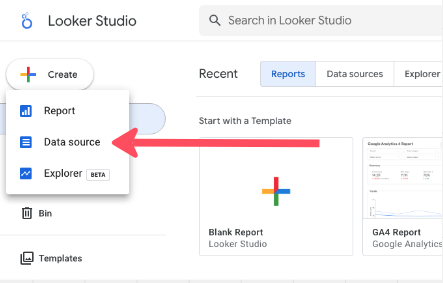
- Open Looker Studio
- Click Create → Data source
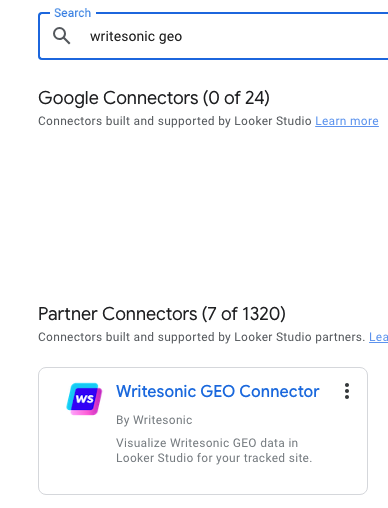
Search for Writesonic GEO Presence in the connector gallery
Step 2: Authorize the Connection
- Click AUTHORIZE to begin authentication
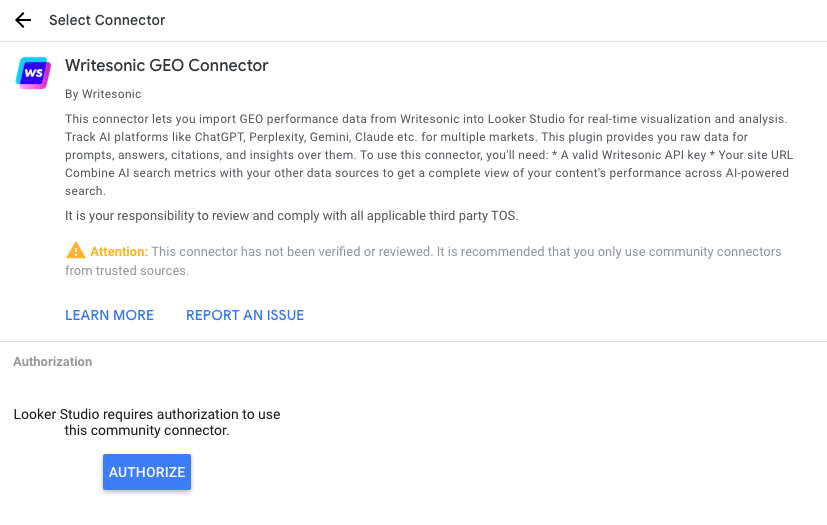
- Sign in with your Google account if prompted
- Grant the necessary permissions
Step 3: Configure Your Data Source
-
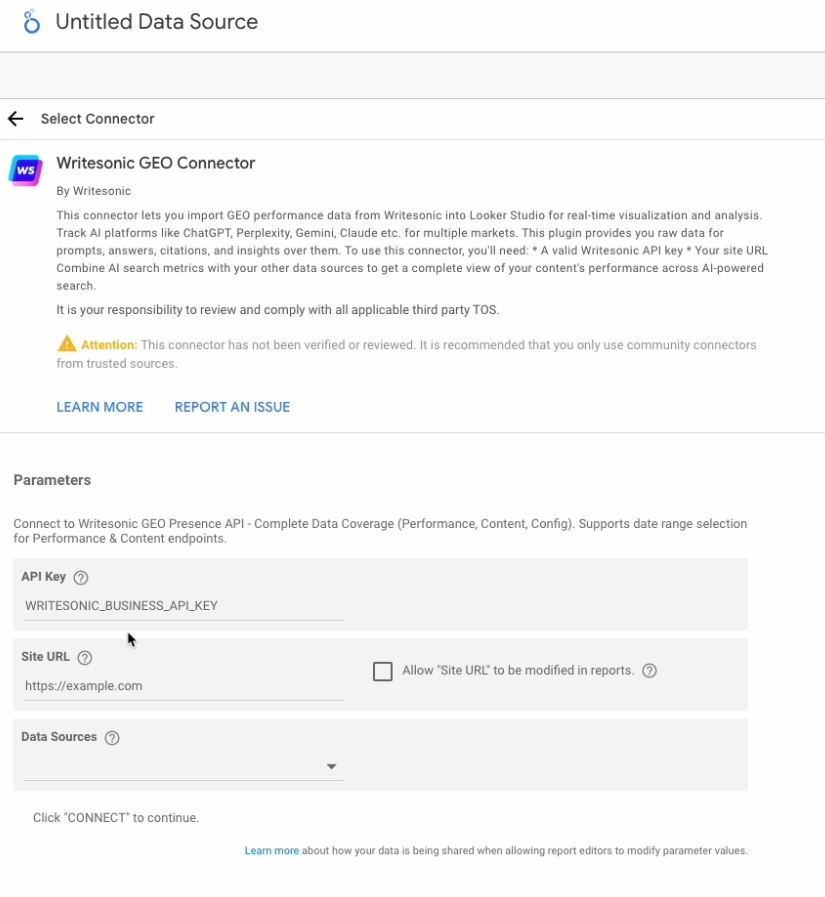
Enter your API Key from Writesonic
-
Enter your Site URL — this must match exactly with the Site URL shown in your GEO Presence project dashboard, makes sure it is an EXACT match.
Examples:
If your dashboard shows https://example.com/, enter https://example.com/
If your dashboard shows https://example.com, enter https://example.comThese are treated as different values. A mismatch will cause an error.
-
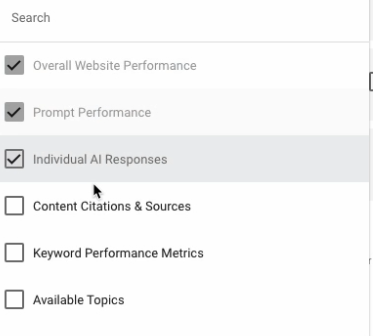
Select one or more Data Sources
Step 4: Connect and Validate
-
Click CONNECT
-
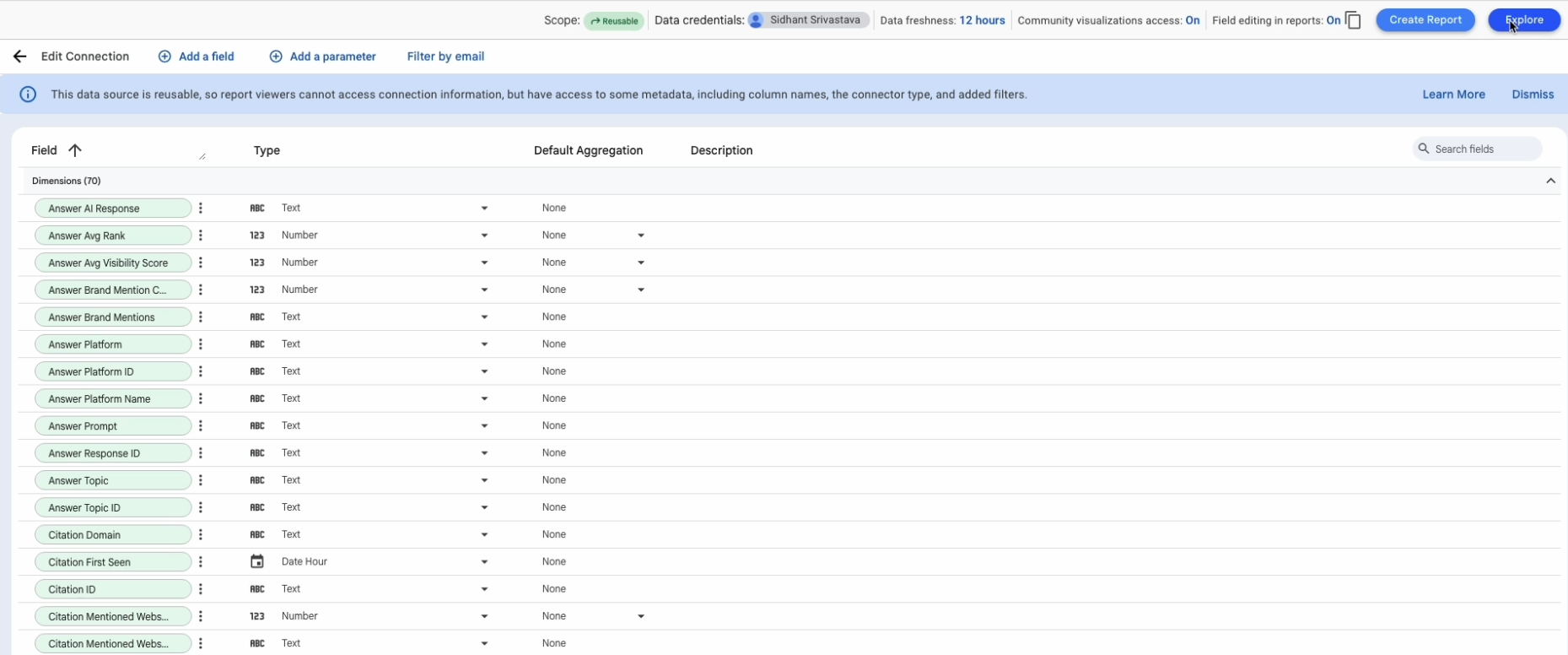
Review the available fields
-
Click CREATE REPORT/EXPORT to start building
Understanding Data Sources
The connector provides access to 10 data sources:
Performance Data Sources (Require Date Range)
Overall Website Performance — Track brand performance metrics aggregated by website, including total prompts, mentions, visibility scores, and rankings over time.
Prompt Performance — Analyze performance metrics for individual prompts, showing which queries drive the most visibility and mentions across AI platforms (ChatGPT, Claude, Gemini, etc.).
Individual AI Responses — Access complete AI-generated responses with full text, brand mentions, platform details, and competitive context.
Content Data Sources (Require Date Range)
Content Citations & Sources — Discover which websites and domains AI platforms cite as sources, including citation URLs, domains, and associated brand mentions.
Keyword Performance Metrics — Extract keywords and themes from AI responses to understand what terminology and topics are associated with your brand.
Configuration Data Sources (No Date Required)
Available Topics — Reference data of all topic categories used to organize prompts and analyze performance by topic.
Available Platforms — Reference data of AI platforms and models (ChatGPT, Claude, Gemini, etc.) being tracked.
Tracked Websites — Reference data of all websites being monitored, including your own website and competitors, with metadata like logos and website types.
Prompts Information — Reference data of all configured prompts with their topics, tags, status, and country codes.
Available Tags — Reference data of all tags used for organizing and filtering prompts.
What is a Dimension in Looker Studio?
A dimension is a categorical or descriptive field used to group, filter, or segment data. Dimensions are not aggregated; they represent attributes or categories.
Characteristics of Dimensions:
- Used for grouping and filtering (e.g., by date, category, name)
- Not aggregated (text, dates, IDs, categories)
- Appear in rows, columns, or filters in charts
- Used to break down metrics
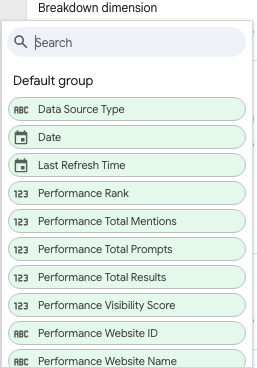
Examples from Your Connector
- Date — groups data by date
- Performance Website Name — groups by website
- Performance Topic Name — groups by topic
- Answer Platform Name — groups by AI platform
- Prompt Type — segments prompts into "Branded" or "Non-Branded"
- Config Website Is Self — boolean filter
What is a Metric in Looker Studio?
A metric is a numeric field that can be aggregated (summed, averaged, counted, etc.).
Metrics represent measurable values and are used to quantify performance, analyze trends, and calculate statistics.
Characteristics of Metrics:
- Numeric values that can be aggregated (sum, average, count, min, max)
- Used to measure performance, quantities, or calculated values
- Appear as values in charts (Y-axis, values in tables, chart data points)
- Can be broken down by dimensions to analyze patterns
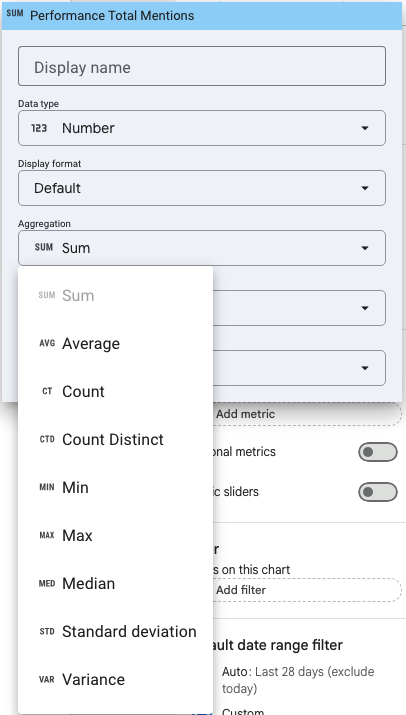
Metrics can be aggregated in various ways
Examples from Your Connector
- Performance Total Prompts — count of prompts analyzed
- Performance Total Mentions — total number of brand mentions
- Performance Visibility Score — visibility percentage (0-100)
- Performance Rank — average ranking position
- Performance Avg Visibility Score — average visibility across models
Dimensions vs. Metrics: How They're Used Differently?
Dimensions
- What they are — Categorical or descriptive fields (text, dates, IDs, booleans)
- Purpose — Group, filter, and segment data
- Where they appear — Row/column headers, filter controls, chart axes (X-axis)
- Example — Performance Website Name groups data by website
Metrics
- What they are — Numeric fields that can be aggregated (sum, average, count, etc.)
- Purpose — Measure performance, quantities, or calculated values
- Where they appear — Values in tables, chart data points, Y-axis values, scorecards
- Example — Performance Total Mentions counts how many mentions occurred
How They Work Together
- Dimensions provide context and categories (e.g., "by website" or "by date")
- Metrics provide measurable outcomes (e.g., "total mentions" or "visibility score")
- Example: A chart using Performance Website Name (dimension) on the X-axis and Performance Total Mentions (metric) on the Y-axis shows mentions per website, enabling performance comparisons and trend analysis
Complete Dimensions Reference for the Writesonic GEO connector
About Meta Fields
Throughout the dimension tables below, you'll see some fields marked as (meta field). A meta field refers to a field that contains information about the data itself, such as unique identifiers used for joining data sources or tracking timestamps.
Common Dimensions (Available in All Data Sources)
| Field | Type | Description | Usage Examples |
|---|---|---|---|
| Data Source Type | Text | Identifies which endpoint the data came from | Filter to show only specific data types in mixed reports |
| Date | Date (YYYYMMDD) | The date for the metric data | Time-series charts, trend analysis, date comparisons |
| Last Refresh Time | DateTime | When the data was last fetched from the API. | |
| Added by Looker Studio | Monitor data freshness, troubleshoot sync issues |
Overall Website Performance Dimensions
| Field | Type | Description | Usage Examples |
|---|---|---|---|
| Performance Website ID(meta field) | Text | Unique identifier for the website | Can be used to join charts with other data sources such as citation view. |
| Performance Website Name | Text | Brand or website name | Group metrics by brand, compare self vs competitors |
| Performance Website URL | URL | Full website URL | Used to view the domain and/or the full link for the website. |
Prompt Performance Dimensions
| Field | Type | Description | Usage Examples |
|---|---|---|---|
| Performance Prompt ID(meta field) | Text | Unique identifier for the prompt | Can be used to join with Prompts Information to view detailed information about the prompt. |
| Performance Prompt Text | Text | The actual AI query text | Identify which questions drive visibility |
| Performance Topic ID | Text | Topic category identifier | Can be used to join with Topics config data to view the specific topics |
| Performance Topic Name | Text | Human-readable topic name | Group analysis by topic category |
| Performance Prompt Tags | Text | Comma-separated list of tags | Filter by tags to see which specific prompts you’d like to see. |
| Prompt Type | Text | "Branded" or "Non-Branded" | Filter or group by prompt type to compare branded vs non-branded performance |
Individual AI Responses Dimensions
| Field | Type | Description | Usage Examples |
|---|---|---|---|
| Answer Response ID(meta field) | Text | Unique identifier for the AI response | Track individual responses |
| Answer Prompt | Text | The prompt that generated this response | See exact questions and answers |
| Answer Platform ID | Text | AI platform identifier | Join with Platform config data |
| Answer Platform Name | Text | Provider name (OpenAI, Anthropic, etc.) | Compare performance across providers |
| Answer Platform | Text | Specific model | Analyze which models mention your brand |
| Answer Topic ID | Text | Associated topic identifier | Can be used to group by topic in other data sources (meta field) |
| Answer Topic | Text | Topic name | Categorical analysis |
| Answer AI Response | Text | Full LLM response text | Read actual AI-generated content |
| Answer Brand Mentions | Text | Summary of brand mentions with ranks | Quick overview of competitive landscape |
| Answer Prompt Tags | Text | Tags associated with the prompt | Campaign and strategy filtering |
| Prompt Type | Text | "Branded" or "Non-Branded" | Filter or group by prompt type to compare branded vs non-branded |
Content Citations & Sources Dimensions
| Field | Type | Description | Usage Examples |
|---|---|---|---|
| Citation ID(meta field) | Text | Unique identifier for the citation | Can be used to join with Tracked Websites view to get more information on citations. |
| Citation Title | Text | Page title of the cited source | Identify which content gets cited |
| Citation URL | URL | Full URL of the citation | View the full URL of where the citation comes from. |
| Citation Domain | Text | Domain name of the citation | Domain-level citation view |
| Citation First Seen | DateTime | When citation was first detected | Timestamp for when that particular citation occurred |
| Citation Mentioned Websites | Text | Brands mentioned in the citation | See which brands appear together |
| Citation Responses | Text | Responses that used this citation | Understand citations in AI responses |
Keyword Performance Metrics Dimensions
| Field | Type | Description | Usage Examples |
|---|---|---|---|
| Keyword ID(meta field) | Text | Unique identifier for the keyword | Track specific keywords |
| Keyword | Text | The extracted keyword or phrase | Identify important keywords |
| Theme | Text | High-level thematic category | Thematic analysis |
| Sub-theme | Text | More specific sub-category | Detailed content analysis |
| Keyword First Seen | DateTime | When keyword was first detected | Track the first time the keywords appeared |
| Keyword Responses | Text | Context where keyword appeared | Understand keyword usage and the relevant context of where it appears |
Configuration Dimensions
Available Topics
| Field | Type | Description |
|---|---|---|
| Config Topic ID (meta field) | Text | Unique topic identifier |
| Config Topic Name | Text | Topic display name |
| Config Topic Created At | DateTime | Creation timestamp |
| Config Topic Updated At | DateTime | Last modified timestamp |
Available Platforms
| Field | Type | Description |
|---|---|---|
| Config Platform ID (meta field) | Text | Unique platform identifier |
| Config Platform Name | Text | Model name |
| Config Platform Provider | Text | Provider (OpenAI, Anthropic, etc.) |
| Config Platform Category ID | Text | Platform category identifier |
| Config Platform Category | Text | Category name |
Tracked Websites
| Field | Type | Description |
|---|---|---|
| Config Website ID (meta field) | Text | Unique website identifier |
| Config Website Name | Text | Brand/website name |
| Config Website URL | URL | Website URL |
| Config Website Is Competitor | Boolean | True if competitor |
| Config Website Is Self | Boolean | True if your own website |
| Config Website Logo URL | URL | Brand logo URL |
| Config Website Created At (meta field) | DateTime | Creation timestamp |
| Config Website Updated At (meta field) | DateTime | Updated timestamp |
Prompts Information
| Field | Type | Description |
|---|---|---|
| Config Prompt ID(meta field) | Text | Unique prompt identifier |
| Config Prompt Text | Text | Full prompt text |
| Config Prompt Topic ID | Text | Associated topic |
| Config Prompt Topic | Text | Topic name |
| Config Prompt Country Code | Text | Market/region code |
| Config Prompt Status | Text | Prompt status (ACTIVE, etc.) |
| Config Prompt Tags | Text | Associated tags |
| Prompt Type | Text | "Branded" or "Non-Branded" |
| Config Prompt Created At (meta field) | DateTime | Creation timestamp |
| Config Prompt Updated At (meta field) | DateTime | Updated Timestamp |
Available Tags
| Field | Type | Description |
|---|---|---|
| Tag ID(meta field) | Text | Unique tag identifier |
| Tag Name | Text | Tag display name |
| Tag Slug | Text | URL-safe tag identifier |
| Tag Prompt Count | Number | Number of prompts with this tag |
| Tag Created At(meta field) | DateTime | Creation timestamp |
| Tag Updated At(meta field) | DateTime | Updated Timestamp |
Complete Metrics Reference
Performance Summary Metrics
| Metric | Type | Description | What Good Looks Like | Usage Examples |
|---|---|---|---|---|
| Performance Total Prompts | Number | Total prompts analyzed for this website | Higher is better (more coverage) | Track question volume trends |
| Performance Total Results | Number | Successful AI responses received | Should be close to Total Prompts | Monitor data completeness |
| Performance Total Mentions | Number | Times your brand was mentioned | Higher is better | Key KPI for brand visibility |
| Performance Visibility Score | Number (0-100) | Percentage of responses mentioning brand | 60%+ is excellent, 40-60% is good | Primary success metric |
| Performance Rank | Number | Average position when mentioned (1=first) | Lower is better (1-3 is ideal) | Prominence in AI responses |
Calculation Notes
- Visibility Score —
(Total Mentions / Total Results) × 100 - Rank — Averaged across all mentions (only counted when brand is mentioned)
Performance Prompts Metrics
| Metric | Type | Description | What Good Looks Like | Usage Examples |
|---|---|---|---|---|
| Performance Total Platforms | Number | Number of AI models that responded | Higher is better | Cross-platform reach analysis |
| Performance Prompt Total Mentions | Number | Total mentions for this specific prompt | Varies by prompt type | Identify high-performing questions |
| Performance Avg Visibility Score | Number (0-100) | Average visibility across all platforms | 50%+ is strong | Prompt-level success tracking |
| Performance Avg Rank | Number | Average rank across platforms | 1-3 is excellent | Prompt prominence analysis |
Performance Answers Metrics
| Metric | Type | Description | What Good Looks Like | Usage Examples |
|---|---|---|---|---|
| Answer Brand Mention Count | Number | Number of brands mentioned in response | Depends on strategy | Competitive landscape per response |
| Answer Avg Rank | Number | Average rank for your brand | 1-3 is excellent | Response-level prominence |
| Answer Avg Visibility Score | Number (0-100) | 0 or 100 (mentioned or not) | 100 is good | Binary mention tracking |
Content Citations Metrics
| Metric | Type | Description | What Good Looks Like | Usage Examples |
|---|---|---|---|---|
| Citation Response Count | Number | How many responses used this citation | Higher = more authoritative | Source authority ranking |
| Citation Mentioned Website Count | Number | Brands mentioned in cited content | Varies by content | Content co-mention analysis |
Content Keywords Metrics
| Metric | Type | Description | What Good Looks Like | Usage Examples |
|---|---|---|---|---|
| Keyword Response Count | Number | Times this keyword appeared in responses | Higher = more relevant theme | Theme relevance tracking |
Configuration Metrics
| Metric | Type | Description |
|---|---|---|
| Tag Prompt Count | Number | Number of prompts tagged with this tag |
Metric Trends
Metric Trends is a time-series data source that returns one row per (date × website) across your entire tracked competitive set. Unlike Performance Summary (which is scoped to your own site), Metric Trends gives you the daily evolution of visibility, share of voice, citation share, mentions, and rank for your brand and every competitor side by side. Date is required. This data source is date-driven — always set a date range on the report or the data source will return an error.
When to Use It
- Tracking how your visibility or rank changes over time
- Comparing your brand against competitors on a single shared metric
- Building stacked area / stacked bar charts for part-to-whole metrics (Share of Voice, Citation Share)
- Competitive positioning bubble charts ("who's where?")
Dimensions
| Field | Type | Description | Usage Examples |
|---|---|---|---|
| Date | Date | Day the metrics were recorded | X-axis for all time-series charts |
| Trends Website ID | Text | Unique identifier for the website | Join to Config Websites / Tracked Websites |
| Trends Website Name | Text | Brand/website display name | Breakdown dimension to split series per brand |
| Trends Website URL | URL | Website URL | Link-outs and grouping |
Metrics
| Metric | Type | Aggregation | Description | What Good Looks Like |
|---|---|---|---|---|
| Trends Visibility Score | Number (0–100) | AVG | % of responses mentioning the brand on that day | Higher is better (60%+ excellent) |
| Trends Share of Voice | Number | AVG | Brand's share of total mentions vs. the tracked set | Higher is better |
| Trends Citation Share | Number | AVG | Brand's share of citations vs. the tracked set | Higher is better |
| Trends Mentions Count | Number | SUM | Total times the brand was mentioned | Higher is better |
| Trends Rank | Number | AVG | Average position when mentioned (1 = first) | Lower is better (1–3 ideal) |
| Trends Total Results | Number | SUM | Total AI responses analyzed that day | Context for the other metrics |
Tip — inverting Rank: Because lower Rank is better, invert the axis (or use a calculated field
0 - Trends Rank) so improvements trend upward in charts.
Data Relationships & How to Use Them Together
Joining Data Sources
Link Performance Summary with Website Config
Performance Website ID → Config Website IDGet brand names, logos, competitor flags, and URLs for your performance data.
Link Performance Prompts with Topic Config
Performance Topic ID → Config Topic IDEnrich prompt performance with full topic metadata.
Link Answers with Platforms
Answer Platform ID → Config Platform IDGet detailed platform information (provider, category) for response analysis.
Creating Your First Report
Quick Start: Executive Dashboard
Let’s build a dashboard that answers: “How is our AI visibility performing?”
Step 1: Create the Data Source
- In Looker Studio, click Create → Data source
- Search for Writesonic GEO Presence
- Configure with your API key and Site URL
- Select the relevant data sources
- Click CONNECT
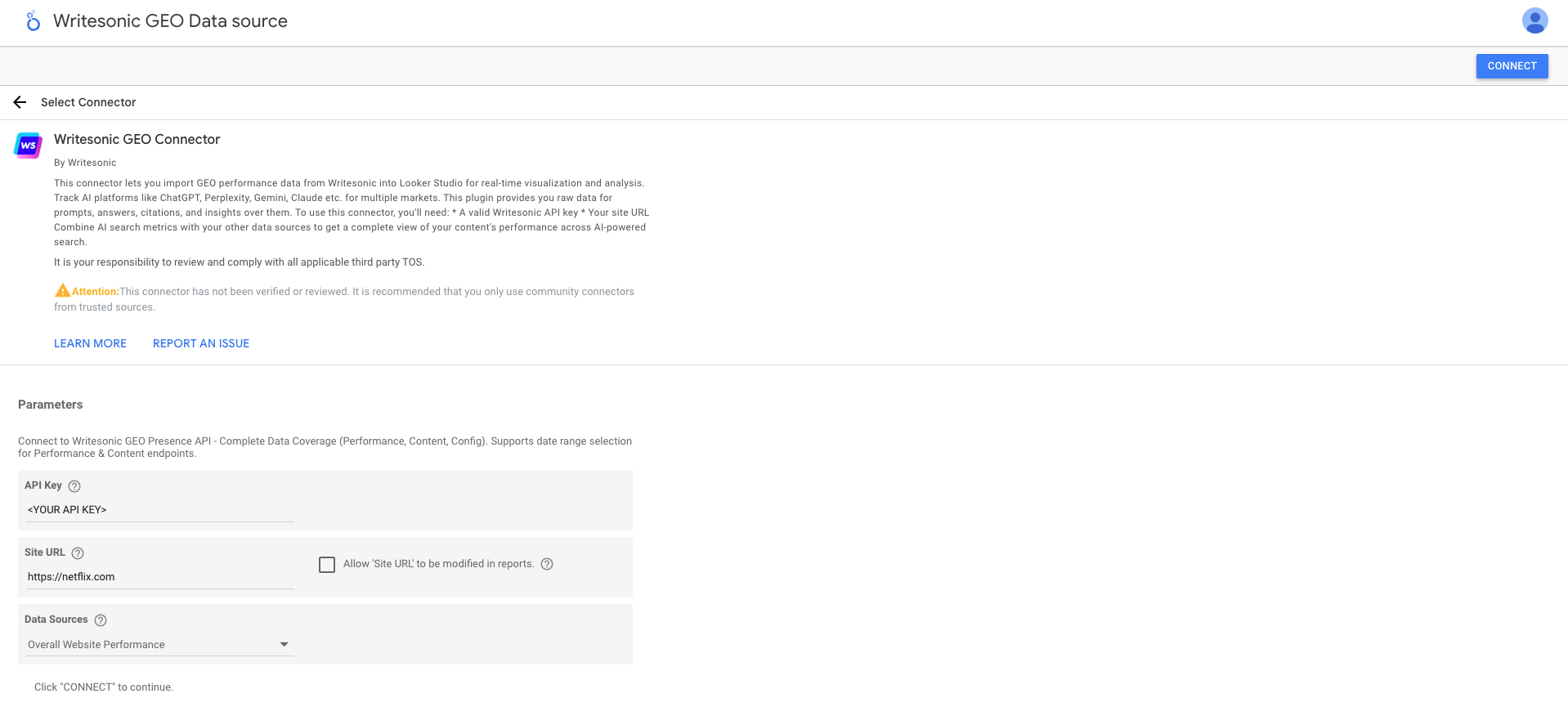
Step 2: Create a New Report
Click CREATE REPORT to open the report editor.
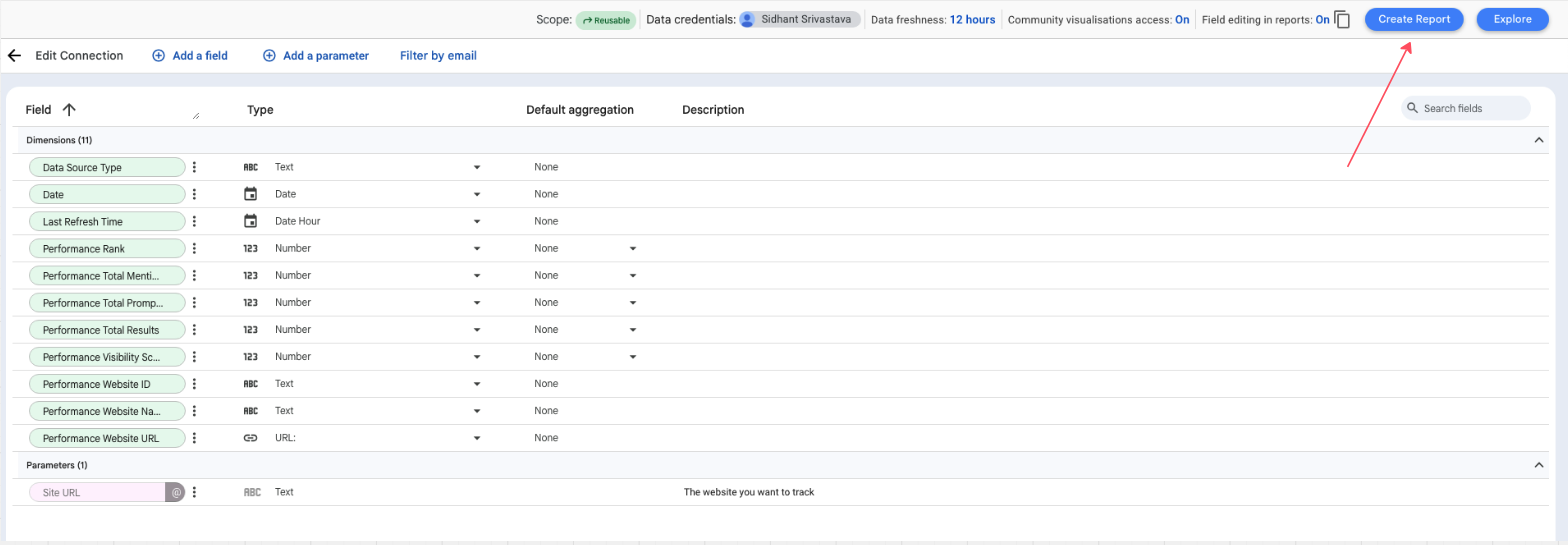
Step 3: Add Key Performance Scorecards (Sample)
Visibility Score Card
-
Add Chart → Scorecard
-
Metric:
Performance Visibility Score -
Date Range Dimension:
Date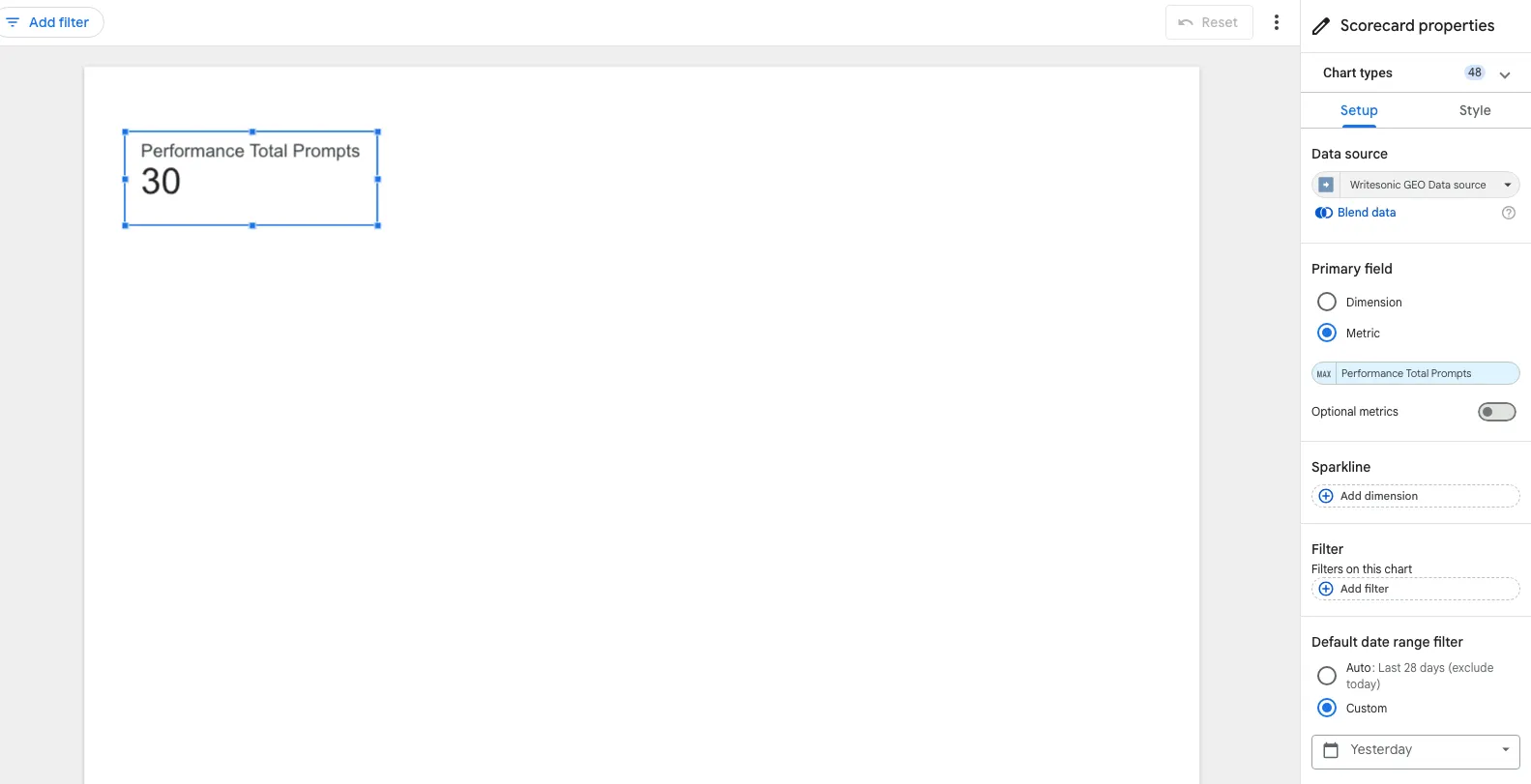
Troubleshooting
Common Issues
"Invalid API Key" or "401 Unauthorized"
- Verify your API key from the Writesonic dashboard
- Ensure you're using the Business API key with GEO Presence access
- Check for extra spaces when copying the key
"Site URL Not Found" or "404 Error"
- The Site URL must match exactly with what appears in your GEO Presence dashboard — including whether or not it has a trailing slash.
For example, https://example.com/ and https://example.com are treated differently. - Ensure the site is active in your GEO Presence project.
- Check for extra spaces when copying the URL.
"No Data Available" or Empty Reports
- Check date range: Try "Last 7 days" to ensure data exists
- Remove or relax filters to test
- Verify data source selection (Config data sources don't require dates)
- Check GEO Presence dashboard for data availability
"Connection Timeout" or Slow Loading
- Reduce date range to 1-3 days
- Select fewer data sources
- Use extract data (Data → Extract data) for historical analysis
- Limit visualizations per page (6-8 max)
Data Not Refreshing
- Manual refresh: Data menu → Refresh data
- Check Last Refresh Time field to verify data age
- Wait 5-10 minutes for API cache to expire
Getting Support
Technical Support — Email: [email protected]
Include: Error details, account email, site URL (not API key)
Sales/Enterprise — Email: [email protected]
Frequently Asked Questions
Q: How often is data updated?
A: Data is updated as new prompts are executed and AI responses collected. The connector uses caching (5-10 minutes) for performance.
Q: Why do some prompts show 0% visibility?
A: The brand wasn't mentioned in any AI responses for that prompt. This is valuable data for identifying content gaps.
Q: What's the difference between "Total Mentions" and "Prompt Total Mentions"?
A: "Total Mentions" is website-level (Summary), "Prompt Total Mentions" is prompt-level (Prompts data source).
Q: Can I track multiple websites in one report?
A: Yes, but each data source connects to one site URL. Create multiple data sources and blend them.
Q: Do rank values account for competitors?
A: Yes, rank shows position among all mentioned brands in a response.
Q: Why are my competitor visibility scores higher?
A: This identifies opportunities. Study their cited content and topics to inform your strategy.
Q: Can I export raw data?
A: Yes, use Looker Studio's export feature or query the API directly for raw JSON/CSV.
Q: How do I calculate Share of Voice?
A: Your Mentions / SUM(All Website Mentions) - create this as a calculated field.
Q: What does "Config Website Is Self = True" mean?
A: It identifies your own website vs. competitors in the Website configuration.
Q: What is the "Prompt Type" dimension?
A: Prompt Type classifies each prompt as either "Branded" (mentions your brand name directly) or "Non-Branded" (generic industry queries). It's available in Prompt Performance, Individual AI Responses, and Prompts Information data sources. Use it to compare how your brand performs when explicitly asked about vs. discovered organically.
For advanced features and enterprise integrations, contact [email protected]
Updated 4 months ago