
Prompts Overview
The Prompts Overview page is your central hub for understanding how your brand performs across AI-generated search results. It aggregates data from major AI platforms — including ChatGPT, Perplexity, Claude, Google AI Overviews, and more — into a single, actionable dashboard.
Use this page to quickly assess where your brand is gaining traction, where it's invisible, and how it stacks up against competitors in AI search.
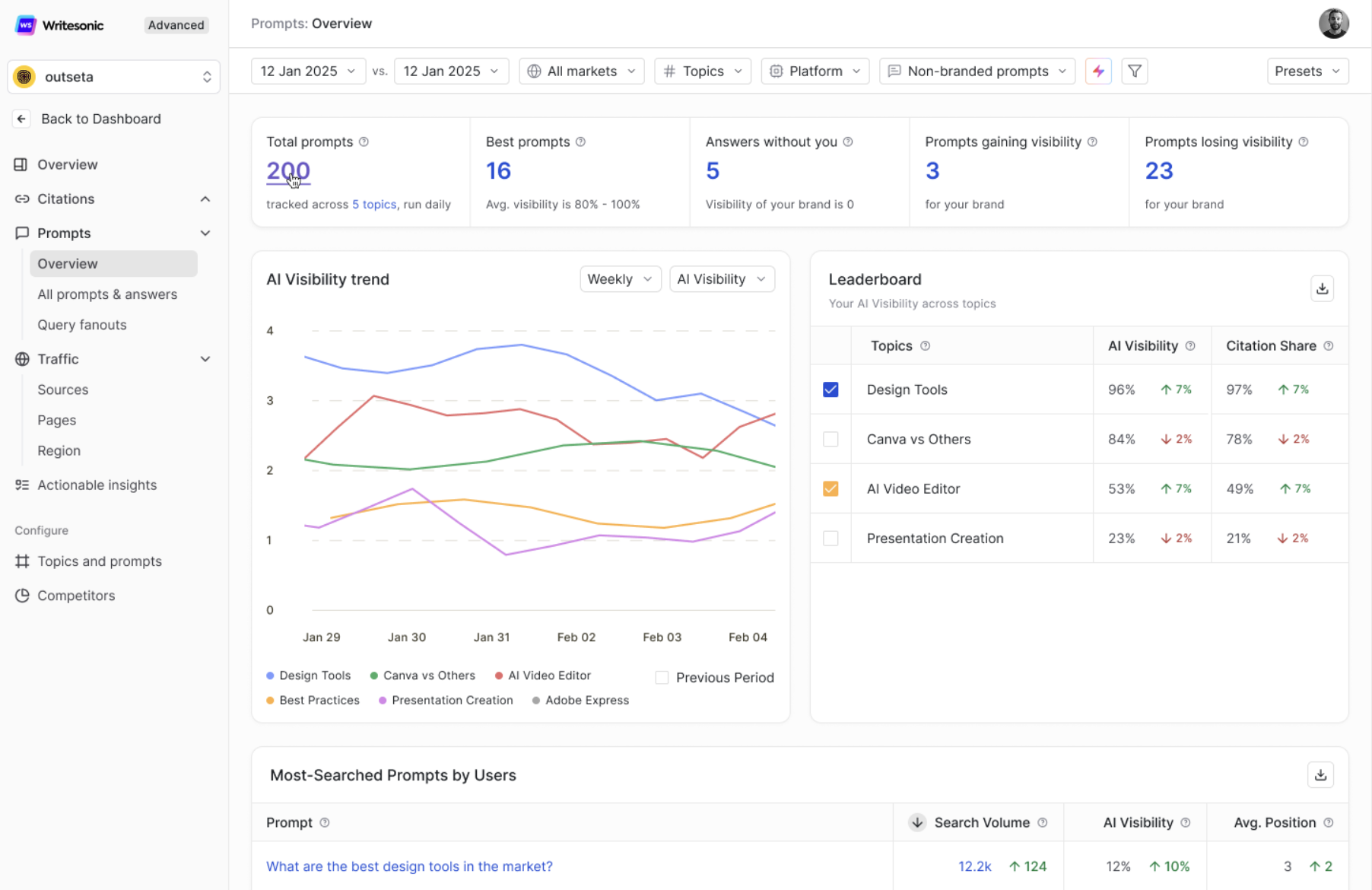
What You'll Find on This Page
The Prompts Overview is organized into distinct sections, each designed to surface a specific layer of insight:
- Summary Cards — High-level prompt and visibility stats at a glance.
- AI Visibility Trend — A time-series chart tracking your brand's visibility over days or weeks.
- Leaderboard — A topic-wise ranking of your brand vs. competitors across key metrics.
- Most-Searched Prompts by Users — The highest-volume prompts your audience is asking across AI platforms.
- Top Prompts Driving Visibility for Your Brand — Prompts where your brand appears most frequently in AI answers.
- Prompts That Don't Mention You — Prompts where competitors are cited but your brand is absent.
Summary Cards
At the top of the page, you'll see a row of summary cards that give you an instant pulse check on your prompt performance.

- Total Prompts — The total number of prompts currently being tracked for your brand, across all configured topics. This also indicates how frequently they're refreshed (e.g., "tracked across X topics, run daily").
- Best Prompts — The count of prompts where your brand has strong AI visibility (typically 80%–100% average visibility). These are your highest-performing queries.
- Answers Without You — The number of AI-generated answers where your brand's visibility is 0%. These represent prompts where AI platforms respond to relevant queries but never mention your brand.
- Prompts Gaining Visibility — Prompts where your brand's visibility has increased compared to the previous period. A rising number here signals that your GEO efforts are working.
- Prompts Losing Visibility — Prompts where your brand's visibility has declined compared to the previous period. Monitor this closely to catch drop-offs early and take corrective action.
Tip: Use the date range selector and comparison toggle at the top of the page to compare metrics across different time periods and spot trends.
AI Visibility Trend
The AI Visibility Trend chart shows how your brand's visibility across tracked prompts changes over time. It's displayed as a line graph, with each line representing a different topic.
What it tracks:
- Your brand's AI Visibility percentage across all tracked prompts, broken down by topic.
- Day-over-day or week-over-week shifts, depending on the selected time range.
- A Previous Period comparison overlay to quickly assess whether performance is improving or declining.
How to use it:
- Spot trends — A sustained upward line indicates strong GEO performance. Declines or plateaus signal a need to investigate prompt coverage or competitor activity.
- Measure campaign impact — After publishing new content or running outreach, check here to see if visibility has shifted.
- Toggle between Weekly and AI Visibility views using the controls above the chart for different levels of granularity.
Tip: If you notice a sudden drop for a specific topic, drill down into the All Prompts page to identify which individual prompts lost visibility.
Leaderboard
The Leaderboard ranks your tracked topics across three core metrics, giving you a competitive snapshot at the topic level.
| Metric | What It Shows |
|---|---|
| AI Visibility | The percentage of prompts (within that topic) where your brand is mentioned in AI answers. |
| Citation Share | The percentage of citations your brand receives relative to all citations within that topic. |
Each row represents a topic you configured during setup. The table also shows change indicators (e.g., ↑ 7% or ↓ 2%) so you can instantly see which topics are trending up or down compared to the previous period.
How to use it:
- Defend your strengths — Topics with high visibility and citation share are your competitive moats. Keep content fresh and authoritative here.
- Identify weak spots — Topics with low or declining metrics need attention. Prioritize content creation or optimization efforts here.
- Benchmark across topics — Compare metrics side-by-side to decide where to allocate resources for the highest impact.
Best Practice: Aim for high AI Visibility and high Citation Share. Visibility means your brand is mentioned; citation share means your content is being used as the source.
Most-Searched Prompts by Users
This section surfaces the highest-volume prompts that users are actively searching for across AI platforms. These are ranked by Search Volume, giving you a clear picture of where the demand is.
For each prompt, you'll see:
- Search Volume — The estimated number of times this prompt is searched, along with the change from the previous period.
- AI Visibility — Your brand's visibility percentage for this specific prompt.
- Avg. Position — Where your brand ranks in AI-generated answers for this prompt (lower is better).
How to use it:
- Prioritize high-volume, low-visibility prompts — These are prompts with significant audience demand where your brand isn't showing up. They represent the biggest growth opportunities.
- Protect high-volume, high-visibility prompts — If your brand already ranks well for a popular prompt, ensure the underlying content stays current and competitive.
- Click "View most searched prompts →" to access the full list and apply filters for deeper analysis.
Top Prompts Driving Visibility for Your Brand
This section highlights the prompts that contribute the most to your brand's overall AI visibility. These are the queries where AI platforms most frequently mention or cite your brand.
For each prompt, you'll see:
- AI Visibility — The percentage of AI answers (across platforms) that mention your brand for this prompt.
- Avg. Position — Your brand's average ranking position within those AI answers.
- Search Volume — How often this prompt is searched, providing context on its reach and impact.
How to use it:
- Identify what's working — These prompts represent your strongest content and positioning. Understand why they perform well (content structure, authority signals, relevance) and replicate that approach for other prompts.
- Keep content fresh — Ensure the pages driving these wins remain accurate, up-to-date, and comprehensive.
- Click "View all high visibility prompts →" for the complete list.
Example: If your brand consistently appears for prompts like "best design tools in the market" — that's a strong signal. Make sure your content behind that query remains the most authoritative and comprehensive.
Prompts That Don't Mention You
This is one of the most actionable sections on the page. It shows prompts where competitors are mentioned by AI platforms, but your brand is completely absent.
For each prompt, you'll see:
- A list of competitors and how frequently each is mentioned for that prompt.
- A "0" next to your brand (labeled "You"), confirming your absence.
How to use it:
- Build your content roadmap — Each prompt here is a gap in your AI visibility. Create or optimize content that directly addresses these queries.
- Analyze competitor content — Look at what competitors are doing differently for these prompts. Are they structured better? More authoritative? More recently updated?
- Track your progress — Revisit this section weekly. As your GEO efforts take effect, prompts should start moving out of this list and into your visibility drivers.
- Click "View more" to explore the full list of missing prompts and prioritize based on competitor frequency and strategic relevance.
Action Tip: These are high-intent queries where your brand is invisible. Filling these gaps is one of the fastest ways to increase your AI market share.
Filters and Controls
The Prompts Overview page includes several filters at the top to help you slice the data in ways that matter most to your strategy:
- Date Range & Comparison — Select a reporting period and compare it against a previous period to track progress.
- Markets — Filter by geographic region if you're tracking multiple markets.
- Topics — Narrow the view to a specific topic to analyze performance at a granular level.
- Platforms — Filter by AI platform (e.g., ChatGPT, Perplexity, Claude) to see how your brand performs on each.
- Branded vs. Non-Branded Prompts — Toggle between prompts that include your brand name and those that don't, to assess organic vs. branded visibility.
- Presets — Use saved filter presets for quick access to your most-used views.
Updated 8 months ago